1. 什么是分词器
切分词语,normalization(提升recall召回率)
给你一段句子,然后将这段句子拆分成一个一个的单个的单词,同时对每个单词进行normalization(时态转换,单复数转换),分词器
recall,召回率:搜索的时候,增加能够搜索到的结果的数量
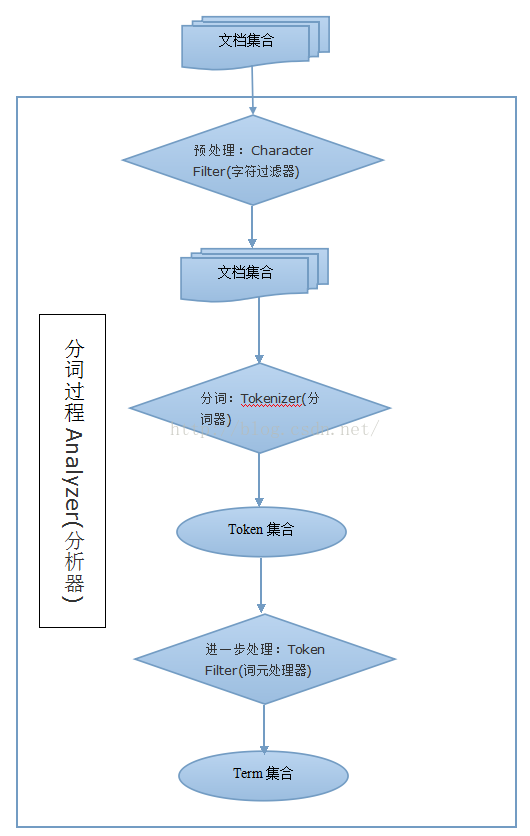
character filter:在一段文本进行分词之前,先进行预处理,比如说最常见的就是,过滤html标签(hello —> hello),& —> and(I&you —> I and you)
tokenizer:分词,hello you and me —> hello, you, and, me
token filter:lowercase,stop word,synonymom,dogs —> dog,liked —> like,Tom —> tom,a/the/an —> 干掉,mother —> mom,small —> little
一个分词器,很重要,将一段文本进行各种处理,最后处理好的结果才会拿去建立倒排索引
2. 分词流程
3. 内置分词器的介绍
Set the shape to semi-transparent by calling set_trans(5)
standard analyzer:set, the, shape, to, semi, transparent, by, calling, set_trans, 5(默认的是standard)
simple analyzer:set, the, shape, to, semi, transparent, by, calling, set, trans
whitespace analyzer:Set, the, shape, to, semi-transparent, by, calling, set_trans(5)
language analyzer(特定的语言的分词器,比如说,english,英语分词器):set, shape, semi, transpar, call, set_tran, 5
4. pinyin拼音分词
pinyin分词github地址:https://github.com/medcl/elasticsearch-analysis-pinyin
注意:也支持将繁体转为拼音
4.1. 下载安装
直接到github下载即可,注意pinyin分词的版本与ElasticSearch版本要对应
解压后,重命名目录,移动到ElasticSearch的plugins目录下1
2mv elasticsearch analysis-pinyin
mv analysis-pinyin /usr/local/elasticsearch/plugins/
重启ElasticSearch即可生效
4.2. keep_first_letter
取每个中文的拼音首字母,串在一起
- 中华人民共和国 ==> zhrmghg
4.3. keep_full_pinyin
将每个中文转为拼音,单独分开
- 中华人民共和国 ==> [zhong, hua, ren, men, gong, he, guo]
4.4. keep_joined_full_pinyin
将每个中文转为拼音,串在一起
- 中华人民共和国 ==> zhonghuarenmengongheguo
4.5. keep_separate_first_letter
取每个中文的拼音首字母,单独分开
- 中华人民共和国 ==> [z, h, r, m, g, h, g]
limit_first_letter_length
“limit_first_letter_length” = 3 && “keep_first_letter” = true
- 中华人民共和国 ==> zhr
5. 分词API
5.1.
1 | GET _analyze |
6. 自定义分词
官方参考:https://www.elastic.co/guide/en/elasticsearch/reference/6.2/analysis-custom-analyzer.html
6.1. 基本的自定义分词
1 | PUT myindex |
6.2. 使用自定义的char_filter/tokenizer/token_filter
1 | PUT myindex |
7. 中文拼音混合搜索建议
参考:
- 配置ik分词及pinyin分词使搜索同时支持中文和拼音搜索 https://blog.csdn.net/u013905744/article/details/80935846
- https://www.jianshu.com/p/781fa2618680
- https://cloud.tencent.com/developer/article/1327419
中文拼音混合:
- tokenizer用ik,token filter用pinyin_filter
- tokenizer用ik_smart,不必用ik_max_word
7.1. 创建中拼混合分词器
1 | PUT test_index |
7.2. 搜索测试
1 | POST test_index/test_type |
7.3. 对于fields的理解
官方说明:https://www.elastic.co/guide/en/elasticsearch/reference/current/multi-fields.html
博文翻译:https://blog.csdn.net/qq_32165041/article/details/83688593