1. 环境要求
- JDK 1.8 + Maven + IDEA
- MySQL 5.7
- ElasticSearch 6.2.4
- SpringBoot 1.5.7
2. 数据库环境
创建数据库
- 名称xunwu
- 编码utf8mb4
导入 resources/db/xunwu.sql
3. 后端框架搭建
Spring Initializr
- Lombok, DevTools
- Web
- JPA
- Security
- Thymeleaf
4. 数据源配置
1 | spring: |
5. SpringBoot2 关闭 Security HTTP Base身份验证
如果想设置身份验证信息,可以在application.yml中设置如下信息1
2
3
4
5spring:
security:
user:
name: root
password: 123456
开发时总要验证,太麻烦,所以关闭1
2
3
4
5
6
7// 添加exclude = {SecurityAutoConfiguration.class}
(exclude = {SecurityAutoConfiguration.class})
public class Application {
public static void main(String[] args) {
SpringApplication.run(Application.class, args);
}
}
集成H2内存数据库(未完成)
不想直接从MySQL访问数据,直接从H2内存数据库获取
1 | # application.yml |
禁止Thymeleaf缓存
1 | spring: |
SpringBoot devtools热加载
spring为开发者提供了一个名为spring-boot-devtools的模块来使Spring Boot应用支持热部署,提高开发者的开发效率,无需手动重启Spring Boot应用
当我们修改了Java类后,IDEA默认是不自动编译的,而spring-boot-devtools又是监测classpath下的文件发生变化才会重启应用,所以需要设置IDEA的自动编译: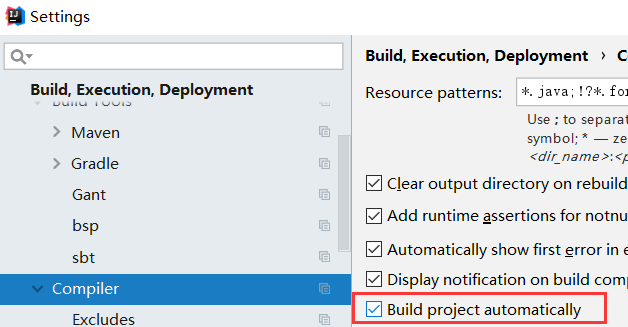
ctrl + shift + alt + /,选择Registry,勾上 Compiler autoMake allow when app running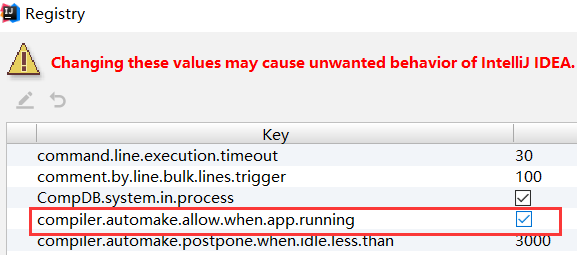
重启IDEA即可生效
默认修改静态资源也会热加载,这是不必要的。所以添加配置1
spring.devtools.restart.exclude=templates/**,static/**
thymeleaf视图能不直接使用@RestController
@RestController使得所有返回json对象,不会跳转视图。使用普通的@Controller即可,要返回JSON的再加@ResponseBody